
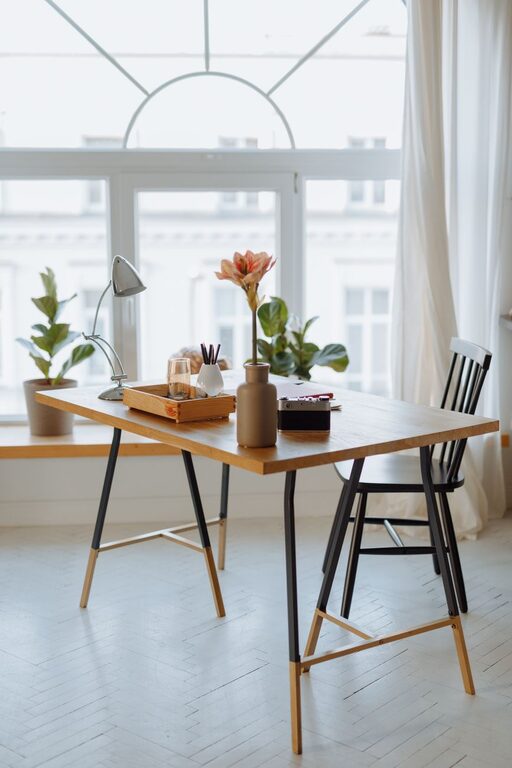
Creating a cozy and inviting home workspace is essential for anyone working from home or pursuing creative projects. A well-designed workspace not only boosts productivity but also enhances your mood and comfort throughout the day. Whether you have a dedicated room or a small corner, you can transform it into a space that feels both functional and welcoming.
In this guide, we’ll explore practical tips to help you design a home workspace that’s comfortable, inspiring, and tailored to your needs.
1. Choose the Right Location
Selecting the perfect spot for your workspace is the first step toward making it cozy and inviting.
– Natural Light: Aim for a location with plenty of natural light. Sunlight improves mood and energy levels.
– Quiet Environment: Find a space away from high-traffic areas to minimize distractions.
– Space Considerations: Ensure there’s enough room for your desk, chair, and any equipment you need without feeling cramped.
If a dedicated room isn’t available, consider setting up near a window or in a quiet corner of a living room or bedroom.
2. Invest in Ergonomic Furniture
Comfort is key when sitting for extended periods. Ergonomic furniture supports your posture and reduces strain.
– Ergonomic Chair: Choose a chair that supports your lower back and allows your feet to rest flat on the floor.
– Adjustable Desk: Sit-stand desks offer flexibility to change positions throughout the day.
– Proper Desk Height: Your desk should allow your elbows to be at a 90-degree angle when typing or writing.
Investing in furniture that fits your body will help prevent discomfort and keep you focused longer.
3. Add Personal Touches
Personalizing your workspace increases comfort and makes the area feel like your own.
– Decor: Incorporate artwork, photos, or inspirational quotes that motivate you.
– Plants: Adding greenery improves air quality and adds a calming element.
– Textiles: Use soft cushions, rugs, or throws to make the space feel warm and inviting.
These touches can turn a sterile office into a space where you feel happy and relaxed.
4. Organize Your Space Efficiently
Clutter can be distracting and stressful. Organizing your workspace helps create calm and promotes productivity.
– Storage Solutions: Use shelves, drawers, or boxes to keep supplies out of sight but accessible.
– Desk Organization: Keep only essential items on your desk to maintain a tidy surface.
– Cable Management: Use clips or sleeves to manage cords and prevent tangles.
Regularly declutter to maintain an organized environment.
5. Optimize Lighting
Good lighting reduces eye strain and enhances productivity.
– Task Lighting: Use a desk lamp with adjustable brightness to highlight your work area.
– Ambient Lighting: Combine natural light with overhead lights or floor lamps for balanced illumination.
– Avoid Glare: Position your computer screen to avoid reflections from windows or lights.
Consider bulbs with a color temperature that mimics daylight for a natural feel.
6. Control Temperature and Ventilation
Comfortable temperature and fresh air play a big role in keeping you focused and comfortable.
– Temperature Control: Use fans, heaters, or air conditioning to maintain a pleasant temperature.
– Ventilation: Keep windows open when possible to circulate fresh air.
– Humidity: A small humidifier or dehumidifier can help balance moisture levels, improving comfort.
Adjust these elements to suit your preferences and local climate.
7. Create Zones for Different Activities
If space allows, designating areas for specific tasks makes your workflow more efficient.
– Work Zone: Set up your computer, paperwork, and primary tools here.
– Break Zone: A comfortable chair or small couch can provide a spot for rest or creative thinking.
– Storage Zone: Allocate a corner or shelf for supplies, books, and files.
Creating distinct spaces reduces mental clutter and helps you switch tasks smoothly.
8. Use Technology Wisely
Technology can enhance your workspace or become a source of distraction, so choose devices carefully.
– Essential Devices: Invest in quality equipment like a reliable computer, keyboard, and high-speed internet.
– Noise Management: Use noise-canceling headphones or white noise machines to block background noise.
– Cable and Device Placement: Keep cords tidy and devices within easy reach to maintain a clean workspace.
Regularly update software and gadgets to keep your workflow efficient.
9. Set a Comfortable Color Scheme
Colors influence mood and energy. Choose a palette that suits your style and promotes focus.
– Neutral Tones: Colors like beige, gray, and white create a calm, distraction-free environment.
– Accent Colors: Use pops of blues or greens for relaxation, or yellows for creativity and energy.
– Consistency: Keep colors harmonious throughout the space for a cohesive look.
Consider your personal preferences and how colors affect your mindset.
10. Incorporate Healthy Habits
Finally, make your workspace supportive of good health practices.
– Regular Breaks: Use timers to remind yourself to stand up and stretch.
– Hydration: Keep a water bottle nearby to stay hydrated.
– Movement: Include space for simple stretches or short exercises during breaks.
A workspace that encourages healthy habits can increase comfort and productivity.
—
Final Thoughts
Designing a cozy and inviting home workspace doesn’t require a large budget or major renovations. Small changes like adding plants, optimizing lighting, and organizing your desk can make a significant difference. Tailor your workspace to fit your personal needs, and you’ll find that working from home becomes more enjoyable and productive.
Remember, your workspace should be a place where you feel comfortable, inspired, and ready to tackle your day. Start with these tips and adjust as you learn what works best for you.